
Odoo Agent Pro Kit now has a dedicated DeepSeek Harness agent preset, bringing its Odoo 17, 18 and 19 development workflows into the Harness web interface. Select Odoo Agent Pro Kit when starting a session to load five lifecycle commands, 22 bundled skills and 11 Odoo tools alongside the standard coding agent.
This September 14, 2026 engineering update covers the integration and the fixes discovered while running it in a real workspace. The DeepSeek addition is currently recorded as unreleased work after the kit’s 0.6.0 version bump; it is available in the source checkout described below.
See the Odoo profile running in DeepSeek Harness
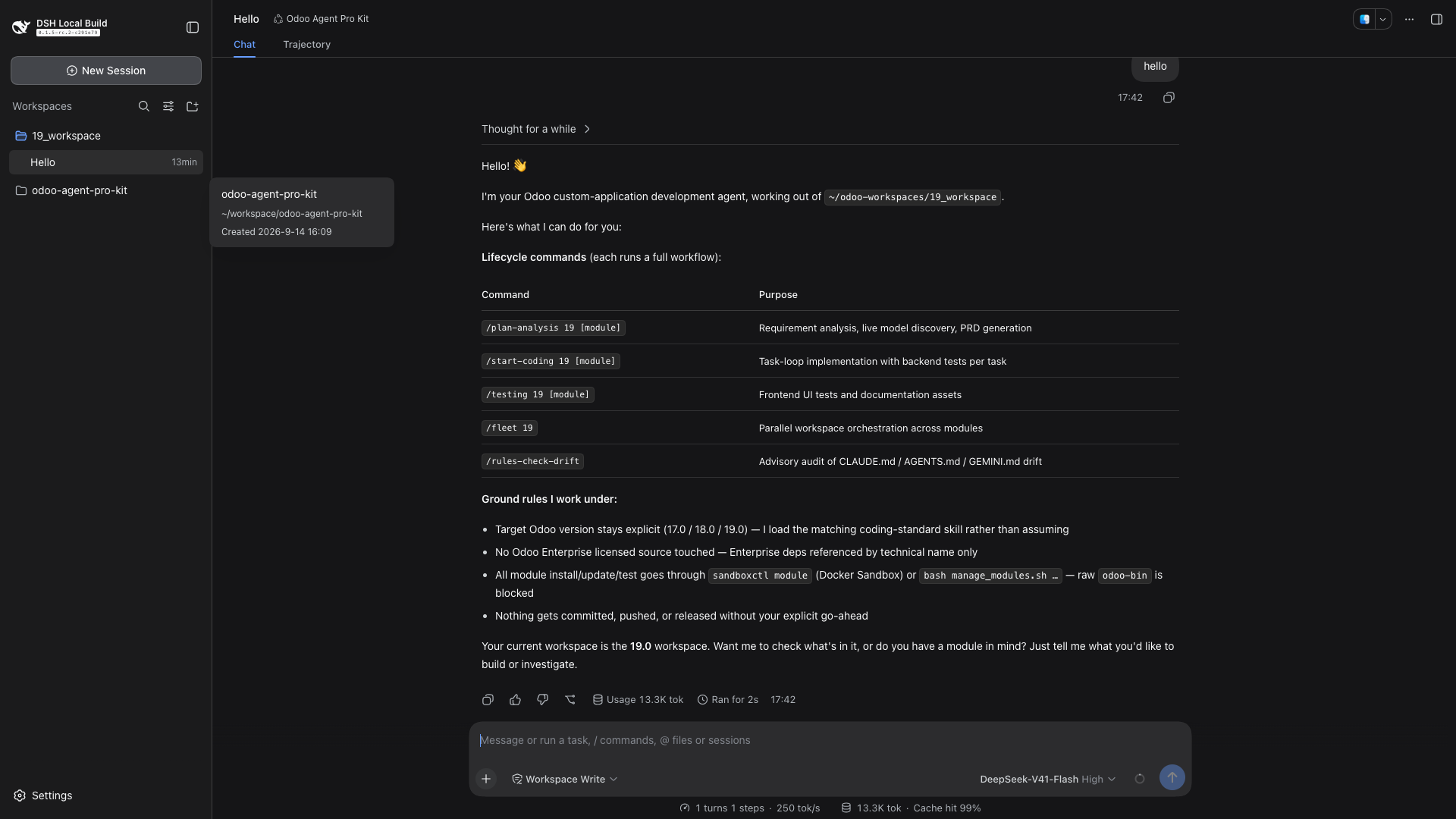
The supplied demonstration shows an Odoo 19 workspace and the selected Odoo Agent Pro Kit profile. The agent explains the planning, coding, testing, fleet and rules-audit workflows. Separate repository session evidence records a successful turn with ten tool calls, workspace detection and custom-module discovery; the captured Hello session is identified precisely in the Trajectory section below.
Trajectory: inspect the live session trace
The Trajectory tab provides a structured view of the session’s recorded events. In the running profile, it shows the initial system-prompt event, the user message, runtime-context entries and the assistant response, organized by turn and request. The timeline includes Input, Model and Tools lanes, with controls for duration, collapsing turns and calls, and searching the trajectory.
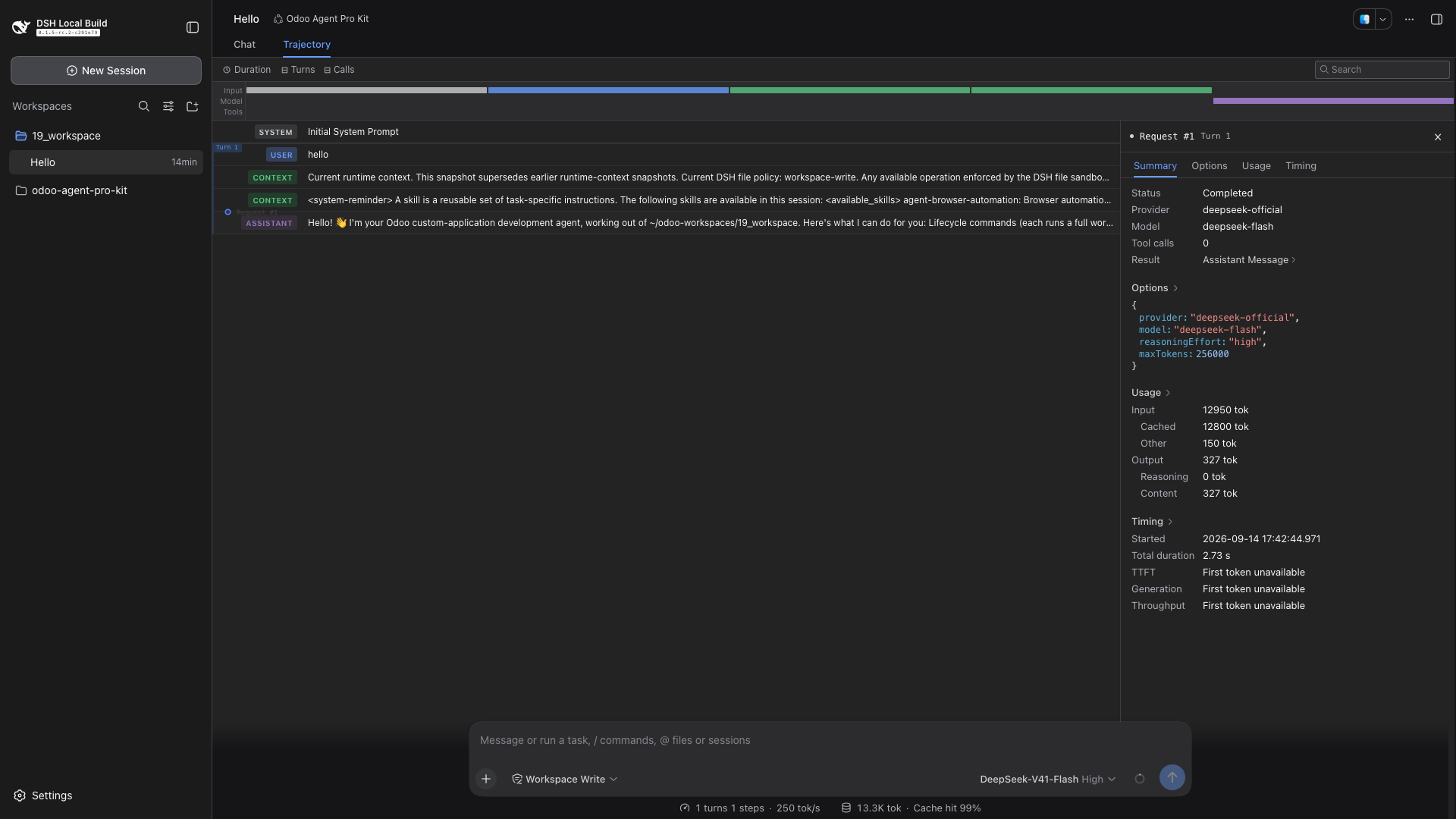
Selecting Request #1 opens a detail pane with Summary, Options, Usage and Timing tabs. The captured request shows its completed status, provider and model, tool-call count, input and output token usage, cached input tokens, start time and total duration. This gives reviewers a concrete way to connect a visible response to the request and runtime context that produced it.
For Odoo teams, the view is useful during debugging and handoff: locate the relevant turn, inspect its context, check request status and usage, and compare the recorded events with the work being reviewed. The captured greeting contains one request and zero tool calls; it demonstrates the trace viewer, not an executed module test. The ten-tool-call session described in the repository history is separate recorded evidence. A trace supports investigation, while backend tests, browser checks and deployment evidence still establish whether an Odoo change works.
What “plugin support” means in this integration
DeepSeek Harness is an open-source agent harness built around Cordis plugins. For the version examined in this update, the kit is installed as an agent preset on the filesystem. The installer supplies a composition file, display metadata and a local JavaScript plugin. Users select the resulting profile from the Harness preset picker.
The composition retains the standard coding agent’s shell, filesystem, search, planning, compaction and delegation capabilities. An additional odoo-kit plugin row registers the Odoo commands, skills, tools, lifecycle prompt and tool guards. Existing Claude Code and Hermes integrations remain available through their own entry points.
Five commands for the Odoo application lifecycle
| Command example | Workflow |
|---|---|
/plan-analysis 19.0 my_module | Analyze requirements, discover live models and produce the product requirements and implementation plan. |
/start-coding 19.0 my_module | Work through implementation tasks with backend validation. |
/testing 19.0 my_module | Run the frontend testing and documentation workflow, including appropriate browser evidence. |
/fleet 19.0 | Invoke the workflow for coordinating work across modules in a versioned workspace. |
/rules-check-drift main...HEAD | Audit whether repository guidance such as AGENTS.md, CLAUDE.md and GEMINI.md still matches the changes. |
Each command reads the existing workflow body from the kit and submits it as a model-visible instruction. A command initiates a workflow; it does not by itself certify that every task, test or release step succeeded. Keep the target Odoo version explicit so the agent applies the matching standards.
22 skills and 11 tools: code with the right context
The integration exposes all 22 bundled skills. Harness skill identifiers use lowercase words separated by hyphens, so the adapter translates names such as odoo_19_coding_standard into odoo-19-coding-standard. This avoids skills being silently omitted because their original names contain underscores.
- Seven live discovery tools: search or list models, inspect fields and relationships, validate a field, inspect model details and obtain version information. These use an in-process JSON-RPC 2.0 client with pooled authentication sessions.
- Three documentation tools:
odoo_kb_search,odoo_kb_readandodoo_kb_listretrieve information from locally installed, version-specific OKF knowledge bundles. - One workspace tool:
odoo_workspace_inforeports the detected version, module, sandbox context and resolved connection information without returning password values.
This gives an agent two distinct sources of context: the actual database structure and the documentation for the chosen Odoo version. Live discovery requires a reachable Odoo database. Offline documentation retrieval requires the corresponding knowledge bundle; the preset reports missing configuration or bundles when those capabilities are unavailable.
Install the preset and start a session
Begin with a working DeepSeek Harness installation and Node.js 22 or newer, as required by this integration. From your Odoo Agent Pro Kit checkout, review the install plan and then install:
./integrations/deepseek/install.sh --dry-run
./integrations/deepseek/install.sh
The preset is copied into ${DSH_HOME:-$HOME/.dsh}/.agent-presets/odoo-agent-pro-kit/. Its kit-root.txt records the checkout location, so retain the checkout and rerun the installer if you move it.
Open your running Harness web UI, create a new session and select Odoo Agent Pro Kit before starting the conversation. The default local web address is http://127.0.0.1:3080/; use the authenticated launch URL printed by your Harness instance when required. This loopback address refers to your own machine and is not a public hosted Odoo service.
Ask the agent to run odoo_workspace_info, confirm the detected version and database, and then start a planning command for your module. A session retains the composition with which it started.
Your workspace .env now supplies Odoo connections
A real-session check exposed a configuration gap: the first adapter read only the Harness process environment, while an existing Odoo workspace already kept its connection settings in .env. Tools therefore reported an unconfigured connection even though the workspace had the required values.
The fix resolves configuration for each tool call from the calling session’s workspace. It searches upward for .env files, up to five levels, and falls back to the kit checkout. Settings are resolved in this order:
- Explicit per-version configuration on the plugin row.
- Harness process environment, preferring version-specific variables over generic ones.
- Workspace
.envlayers, again preferring version-specific variables.
Supported names include ODOO19_URL, ODOO19_DB_NAME, ODOO19_DB_USER and ODOO19_DB_PASSWORD, with matching Odoo 17/18 prefixes and generic ODOO_* fallbacks. DEFAULT_ODOO_VERSION can select the default version. Configure real credentials locally and keep them out of shared screenshots and source control.
Parsed files are cached by modification time. The parser handles quoted values, export prefixes and inline comments, and skips malformed lines. In Docker Sandbox workspaces, .sandbox/session.json also provides session context. Discovery tools connect to an existing server; installing the preset does not start Odoo.
Two reliability fixes found beyond the initial mount test
Tool schemas accepted by the model provider
The original preset mounted successfully, but a real turn failed because a tool property contained required: true. Direct registration expects JSON Schema, where required is an array on the containing object. The fix corrected all 11 tool schemas and added strict schema checks. This is why verifying a mounted plugin and verifying an actual model turn are separate steps.
Reinstalling really loads the updated plugin
A second issue kept old JavaScript active after reinstalling, even in a new session. Harness tracked changes to the composition file, while Node cached the imported module. The installer now places a content hash in the installed plugin specifier, such as ./odoo-kit.mjs?v=<hash>. Changing the plugin updates both the composition and the module URL.
After pulling an update, rerun the installer and start a new session. If you edit the installed JavaScript directly instead, restart the Harness process. Merely opening another session is insufficient for that manual-edit case.
Development guardrails and current scope
The JavaScript adapter includes tool guards for raw Odoo execution, controlled module-management entry points, VCS writes, destructive cleanup and licensed Enterprise source access. These mirror the kit’s existing guard authorization semantics. They help keep the selected workflow consistent, but do not replace the required runtime permissions, tests and review.
The full Python lint and gate pipeline is not ported to DeepSeek Harness. The DSH adapter reimplements deterministic guardrails; the Python hooks remain the fuller pipeline implementation for Claude Code and Hermes. Odoo 20 has a migration roadmap in the repository, but this preset’s documented version scope is Odoo 17, 18 and 19.
Validation evidence and source history
The latest integration commit records 228 passing repository tests and 30 plugin checks, plus a mounted preset with 29 active composition rows. These are the project’s recorded September 14 results. The successful real session and workspace configuration checks add evidence beyond static installation checks; they do not claim a complete application build or production deployment.
- e4e1329 — initial DeepSeek Harness preset integration
- d2e5da6 — provider-compatible JSON Schema
- 912597c — reliable preset reload after reinstalling
- e2139fc — workspace .env connection resolution
For setup details, consult the preset installation guide and integration documentation. See the Odoo Agent Pro Kit repository for the wider multi-agent toolkit.
Bring structured AI workflows to your Odoo project
VPerfectCS can help assess your Odoo development workflow, configure version-aware agent tooling and plan custom application delivery.
Discuss your Odoo project